
Model Reference
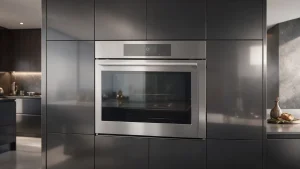
Fisher & Paykel OB30SMPSUNG3 Handleless Self-Cleaning Steam Assist Oven
Grey glass handleless steam assist oven; door release and heating faults are the usual calls.
Model-specific diagnosis

Model number
OB30SMPSUNG3
About this model
Model overview
Grey glass finishes the Fisher & Paykel OB30SMPSUNG3, a handleless steam assist oven that holds 4.6 cu ft usable and runs its settings from a 6.8-inch touchscreen. A press of the front releases the door, and twin vertical fans keep the heat moving. A wired temperature sensor is included, and pyrolytic self-cleaning handles the cavity after heavy use. Customers across San Francisco and the Bay Area often describe a temperature that does not match the reading or a display that freezes. Please describe the symptom, copy the full model number from the rating label and note any error shown.
Specifications
| Capacity | Usable capacity: 4.6 cu ft. |
|---|---|
| Features | Steam Assist combines convection heat with steam. Twin vertical fans. Wired temperature sensor included. |
| Controls | Door operates at a button press. 6.8-inch touchscreen. |
| Care | Pyrolytic self-cleaning. |
| Finish | Grey glass finish. |
Steam Assist and the grey glass on the OB30SMPSUNG3
The grey finish is the only difference from its black counterpart, since the Steam Assist cavity and its controls are the same. That means cooking results should be judged on the same terms, whichever finish sits in the kitchen. Day to day, the wiping routine is the one thing the finish changes, so a soft cloth on the front panel is enough.
Error codes and steam checks on the OB30SMPSUNG3
Start with the control panel, because an error code tells the technician which circuit to examine first: the sensor, the element or the fan. A cavity that will not heat or preheats slowly is checked at the element and its relay before any control board is swapped. If the door stays locked after a cycle, the latch or the release button needs a closer look, so the owner should leave it alone rather than force it. On the steam side, the technician reviews the water supply and the steam path together, and the owner can report whether any steam indicator ever lit. Switch off the breaker before any panel comes off, and wait for the cavity to cool first.
What owners notice
- Error code shown on the touchscreen.
- Cavity slow to preheat or not heating.
- Reading that drifts from the wired sensor.
- Touchscreen that freezes or fan that stops.
Booking
Send the full OB30SMPSUNG3 number, the error on the touchscreen and what the cavity did before it stopped. We check the parts tied to that symptom and send a written estimate; nothing goes ahead without your approval. See also: Fisher & Paykel Combi-Steam Oven Repair in San Francisco.
FAQ
Frequently asked questions
Usable capacity is 4.6 cu ft, and the touchscreen is 6.8 inches across.
Yes, the door operates at a button press, so the front has no handle to pull.
Check the rating label on the frame around the door opening, visible with the door open. Copy every letter and digit, including the ones at the end.
Yes. We book in-home visits for this model in San Francisco and the Bay Area. Add the model number and the symptom to the booking form.
Diagnostics
Error codes for this appliance
Fisher & Paykel Oven A2 Error Code
Fisher & Paykel Oven A3 Error Code
Fisher & Paykel Oven F101 Error Code
Fisher & Paykel Oven F102 / F104 / F194 / F196 Error Code
Fisher & Paykel Oven F103 / F237 / F610 / F613 and Related Codes
Fix it right
Repair service
Models
Other models
Fisher & Paykel OB60SD11PX1 Oven
Fisher & Paykel OM24NDB1 Compact Convection-Speed Oven
Fisher & Paykel OM24NMTNB1 Minimal Handleless Compact Convection-Speed Oven
Fisher & Paykel OM24NMUNB5 Compact Convection-Speed Oven
Fisher & Paykel OM24NMUNG5 Compact Convection-Speed Oven
Fisher & Paykel OM30NDLX1 Compact Convection-Speed Oven
Book a repair
Tell us what’s wrong — we’ll take it from there
Share a few details and we’ll confirm an appointment. Prefer to talk? Call us and we’ll help right away.
Phone
(415) 941-6957
Hours
Mon–Sat: 8:00 AM – 7:00 PM
Service area
San Francisco Bay Area, California