
Model Reference
Fisher & Paykel OM24NMTNB1 Minimal Handleless Compact Convection-Speed Oven
Handleless compact speed oven where owners see wrong temperatures, slow preheat or a touchscreen that shows an error code.
Model-specific diagnosis

Model number
OM24NMTNB1
About this model
Model overview
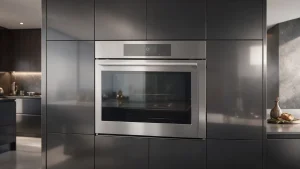
The OM24NMTNB1 is a handleless compact convection-speed oven from Fisher & Paykel's Minimal line, with a 1.7 cu ft cavity, 22 cooking functions and a black glass front. A 5-inch guided touchscreen steers each program, and the button-operated door opens without a handle, which keeps the front clean. Owners across San Francisco and the Bay Area most often report a slow preheat, a temperature that runs away from the set point or a display that goes blank. When you book, include the symptom, the full model number from the rating label and the error code on the screen.
Specifications
| Dimensions | Width is 23 7/16 inches. |
|---|---|
| Capacity | Total capacity is 1.7 cu. ft. |
| Features | Twenty-two cooking functions. Four shelf positions. Wired temperature sensor. |
| Controls | 5-inch guided touchscreen. Button-operated handleless door. |
| Finish | Black glass finish. |
Handleless front and the button door release
The handleless front with a button-operated door separates it from handle-pull ovens, since the release is a button rather than a pull. The wired temperature sensor is a probe that goes into the cavity, and four shelf positions give room to set racks for a compact load.
Speed oven checks before a visit
When this speed oven misbehaves, a technician checks the temperature sensor and the heating system together, because a sensor that reads wrong makes a working oven look like it is off setting. The wired sensor is a common failure point, and the owner can safely unplug the oven, let it cool and check the sensor lead for a pinched or loose connection before booking. A slow preheat often traces to the heating element, the fan or a door seal that lets heat escape, so note how long the oven takes to reach temperature. A button-operated door release that does not respond is usually a switch or a control board fault rather than a door problem. Record any error code on the touchscreen exactly.
What owners notice
- Touchscreen error code shown on the panel.
- Cavity running cooler or hotter than the set point.
- Slow preheat from the 1.7 cu. ft. cavity.
- Fan, light or touchscreen that stops responding.
Booking
Note the OM24NMTNB1 model number and the error shown on the touchscreen. The visit starts with tests on the parts that match your symptom, followed by a written estimate. Repairs wait for your approval. Related page: Fisher & Paykel Oven Repair in San Francisco.
FAQ
Frequently asked questions
It has a compact 1.7 cu ft cavity with four shelf positions.
Twenty-two cooking functions are selected on the 5-inch guided touchscreen.
Check the rating label on the frame around the door opening, visible with the door open. Copy every letter and digit, including the ones at the end.
Yes. We book in-home visits for this model in San Francisco and the Bay Area. Add the model number and the symptom to the booking form.
Diagnostics
Error codes for this appliance
Fisher & Paykel Oven A2 Error Code
Fisher & Paykel Oven A3 Error Code
Fisher & Paykel Oven F101 Error Code
Fisher & Paykel Oven F102 / F104 / F194 / F196 Error Code
Fisher & Paykel Oven F103 / F237 / F610 / F613 and Related Codes
Fix it right
Repair service
Models
Other models
Fisher & Paykel OM24NMUNB5 Compact Convection-Speed Oven
Fisher & Paykel OM24NMUNG5 Compact Convection-Speed Oven
Fisher & Paykel OM30NDLX1 Compact Convection-Speed Oven
Fisher & Paykel OM30NMUG3 Compact Convection-Speed Oven
Fisher & Paykel OM30NPTX1 Convection Speed Oven
Fisher & Paykel OM30NPX1 Convection Speed Oven
Book a repair
Tell us what’s wrong — we’ll take it from there
Share a few details and we’ll confirm an appointment. Prefer to talk? Call us and we’ll help right away.
Phone
(415) 941-6957
Hours
Mon–Sat: 8:00 AM – 7:00 PM
Service area
San Francisco Bay Area, California