
Model Reference
Fisher & Paykel OM30NDLX1 Compact Convection-Speed Oven
Compact 30-inch speed oven with an error code on the display, slow preheat or a fan that goes quiet.
Model-specific diagnosis

Model number
OM30NDLX1
About this model
Model overview
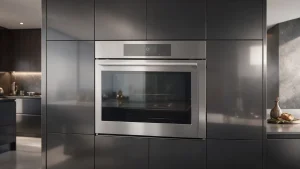
The OM30NDLX1 is a compact 30-inch convection speed oven from Fisher & Paykel with four shelf positions and a guided cooking interface on its display. It is 29 15/16 inches wide, and a wired temperature sensor is included so the cavity can be checked against the setting. Wi-Fi links the oven to SmartHQ, and removable shelf runners make the cavity easier to clean. The CoolTouch door stays cool on the outside. Local owners should note the symptom, the complete model number from the label and any error code on the display.
Specifications
| Dimensions | Width: 29 15/16 inches. |
|---|---|
| Features | Four shelf positions. Wired temperature sensor included. CoolTouch door. |
| Controls | Guided cooking interface. Wi-Fi connects to SmartHQ. |
| Care | Removable shelf runners. |
| Finish | Stainless steel finish. |
LED display and illuminated dial on the OM30NDLX1
The OM30NDLX1 is set apart by its LED display and illuminated dial, a pairing that places the guided interface and a physical control on one panel. Removable shelf runners and four shelf positions give the owner flexibility in the cavity. A wired sensor reading that drifts from the dial is the clearest sign that the heat is off, and it is worth noting along with the code the display shows.
Error codes and sensor readings on the OM30NDLX1
An error code on the display usually comes from the control board or a sensor reading that falls outside its range, so a technician reads the code before swapping any part. A speed oven that heats slowly points to the heating element, the wired sensor or the convection fan, and a fan or light that stops checks the fan motor and the lamp circuit. Shelf runners should sit fully, the sensor cable should be seated and the door should close without gaps. Keep the sensor cable away from the heating element during cooking, and do not pull the display connector loose yourself. Wi-Fi drops are a separate matter from heating faults.
What owners notice
- Code shown on the display panel.
- Heat that differs from the dial setting.
- Slow preheat or no heat at all.
- Light, fan or screen out.
Booking
An error code on the OM30NDLX1 display is read against the wired sensor reading before any part is swapped, so the cavity temperature is logged first. Send the label number and the code, and approve the written estimate before work starts. For the booking: Fisher & Paykel Oven Repair in San Francisco.
FAQ
Frequently asked questions
It measures 29 15/16 inches wide, so check that the opening matches a 30-inch cutout before ordering.
Yes, Wi-Fi connects the oven to SmartHQ, while the guided cooking interface is operated on the display itself.
Check the rating label on the frame around the door opening, visible with the door open. Copy every letter and digit, including the ones at the end.
Yes. We book in-home visits for this model in San Francisco and the Bay Area. Add the model number and the symptom to the booking form.
Diagnostics
Error codes for this appliance
Fisher & Paykel Oven A2 Error Code
Fisher & Paykel Oven A3 Error Code
Fisher & Paykel Oven F101 Error Code
Fisher & Paykel Oven F102 / F104 / F194 / F196 Error Code
Fisher & Paykel Oven F103 / F237 / F610 / F613 and Related Codes
Fix it right
Repair service
Models
Other models
Fisher & Paykel OM30NMUG3 Compact Convection-Speed Oven
Fisher & Paykel OM30NPTX1 Convection Speed Oven
Fisher & Paykel OM30NPX1 Convection Speed Oven
Fisher & Paykel OS24NDTDX1 Series 9 Contemporary Compact Combi-Steam Oven
Fisher & Paykel OS24NMTDB1 Combination Steam Oven
Fisher & Paykel OS24NMTNB1 Handleless Compact Combi-Steam Oven
Book a repair
Tell us what’s wrong — we’ll take it from there
Share a few details and we’ll confirm an appointment. Prefer to talk? Call us and we’ll help right away.
Phone
(415) 941-6957
Hours
Mon–Sat: 8:00 AM – 7:00 PM
Service area
San Francisco Bay Area, California