
Model Reference
Fisher & Paykel OB30SDPTDB1 Oven
Black 30-inch oven where the touchscreen stops responding, the dial lags or the heat runs off the setting.
Model-specific diagnosis

Model number
OB30SDPTDB1
About this model
Model overview
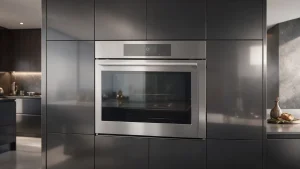
The OB30SDPTDB1 is a black 30-inch single oven from the Minimal range of Fisher & Paykel, with 4.1 cu ft of total capacity and 17 oven functions for homes across San Francisco and the Bay Area. Guided touchscreen cooking walks the owner through each program, and an illuminated dial handles quick changes. Three sets of full-extension sliding shelves and a food probe come supplied, and a self-clean function covers the cavity. Tell the technician which function was running, the model number exactly as the label shows, and any code on the touchscreen.
Specifications
| Capacity | Total capacity: 4.1 cu ft. |
|---|---|
| Features | 17 oven functions. Three sets of full-extension sliding shelves. Food probe supplied. |
| Controls | Guided touchscreen cooking. Illuminated control dial. |
| Care | Self-clean function. |
| Finish | Black finish. |
Guided touchscreen and dial on the OB30SDPTDB1
What sets the OB30SDPTDB1 apart is its guided touchscreen paired with a dial that lights up, so the owner picks a program on the screen and adjusts heat on the dial. The three shelf sets and the included food probe make multi-rack roasting and checking easier. If the screen or dial stops responding, the touch and dial electronics are the first place to look, since they control every setting on this oven.
Where a technician starts with a silent or slow oven
A slow preheat or an oven that will not heat usually leads a technician to the heating element, the temperature sensor and the relay on the control board, in that order. Temperature that runs off the setting points to the sensor or its wiring, and a fan, light or display that stops checks the fan motor and the touch board behind the fascia. A code on the screen narrows the search, so the owner should note it before any work starts. Racks should sit fully on their runners, and the food probe should be unplugged while the oven is in use. Do not remove the fascia or pull the wiring loom yourself, since the touch board holds the settings.
What owners notice
- Preheat that stalls or no heat at all.
- Fan, light or screen gone dark.
- Setting that does not match the real temperature.
- Code showing on the control panel.
Booking
Send the full model number from the label, the touchscreen code and a short description of what the oven did. We check the parts tied to that symptom and send a written price, and nothing starts until you approve it. Related page: Fisher & Paykel Oven Repair in San Francisco.
FAQ
Frequently asked questions
Total capacity is 4.1 cu ft, set inside a 30-inch opening.
It has 17 oven functions, and the guided touchscreen steps through each one.
Check the rating label on the frame around the door opening, visible with the door open. Copy every letter and digit, including the ones at the end.
Yes. We book in-home visits for this model in San Francisco and the Bay Area. Add the model number and the symptom to the booking form.
Diagnostics
Error codes for this appliance
Fisher & Paykel Oven A2 Error Code
Fisher & Paykel Oven A3 Error Code
Fisher & Paykel Oven F101 Error Code
Fisher & Paykel Oven F102 / F104 / F194 / F196 Error Code
Fisher & Paykel Oven F103 / F237 / F610 / F613 and Related Codes
Fix it right
Repair service
Models
Other models
Fisher & Paykel OB30SDPTDX2 Self-Cleaning Oven
Fisher & Paykel OB30SMPSUNB3 Handleless Self-Cleaning Steam Assist Oven
Fisher & Paykel OB30SMPSUNG3 Handleless Self-Cleaning Steam Assist Oven
Fisher & Paykel OB60SD11PX1 Oven
Fisher & Paykel OM24NDB1 Compact Convection-Speed Oven
Fisher & Paykel OM24NMTNB1 Minimal Handleless Compact Convection-Speed Oven
Book a repair
Tell us what’s wrong — we’ll take it from there
Share a few details and we’ll confirm an appointment. Prefer to talk? Call us and we’ll help right away.
Phone
(415) 941-6957
Hours
Mon–Sat: 8:00 AM – 7:00 PM
Service area
San Francisco Bay Area, California