
Model Reference
Fisher & Paykel OB30SDPTDX2 Self-Cleaning Oven
30-inch pyrolytic single oven with 17 functions; dead fans, drifting heat and locked doors are the usual calls.
Model-specific diagnosis

Model number
OB30SDPTDX2
About this model
Model overview
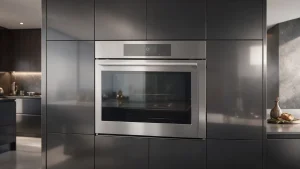
The Fisher & Paykel OB30SDPTDX2 is a 30-inch single oven with 4.1 cu ft of total capacity, 17 oven functions and a five-inch guided cooking touchscreen. An illuminated dial sits beside the screen, and ActiveVent moisture control manages humidity during roasting. AeroTech heat circulation spreads warmth across the cavity, while pyrolytic self-cleaning handles the interior between cooks. Households across San Francisco and the Bay Area often report a fan or light that quits, a temperature that drifts or a door lock that holds after cleaning. Include the symptom, the full model number from the rating label and any code shown on the display.
Specifications
| Dimensions | Width: 29 15/16 inches. |
|---|---|
| Capacity | Total capacity: 4.1 cu ft. |
| Features | 17 oven functions. ActiveVent moisture control. AeroTech heat circulation. |
| Controls | Five-inch guided-cooking touchscreen. |
| Care | Pyrolytic self-cleaning. |
| Finish | Stainless steel finish. |
Dial, touchscreen and ActiveVent on the OB30SDPTDX2
The illuminated dial and the guided touchscreen share the front, so either one can set the program. The ActiveVent control and AeroTech circulation are what separate its bake results from a plain convection cavity, so uneven browning is judged against those settings. Day to day, the chosen function matters more than the cavity size for most dishes, and heat drift is best judged after a full preheat.
Light, fan and lock checks on the OB30SDPTDX2
A fan or light that stops while the display still works is tested at the fan motor and the lamp circuit before the control board. Temperature that is off from the setting is checked at the sensor and the AeroTech fan, since poor circulation can make a correct reading look wrong. Door lock trouble after a self-clean is handled at the latch and lock motor once the cavity has cooled. An error code on the panel is the clue to start with, and the owner should write it down exactly. Turn off the breaker before opening the back panel or the lower trim.
What owners notice
- Fan or light out while the display still works.
- Door lock held after self-clean.
- Heat that drifts from the set value.
- Error code on the front panel.
Booking
Write down the exact code and the OB30SDPTDX2 model from the label before the visit. The fan motor, the lock and the sensor are tested against what you saw, and the cavity is cooled before any panel comes off. A written estimate follows. Related oven service: Fisher & Paykel Oven Repair in San Francisco.
FAQ
Frequently asked questions
Total capacity is 4.1 cu ft, and the oven offers 17 functions.
The guided touchscreen measures five inches across.
Check the rating label on the frame around the door opening, visible with the door open. Copy every letter and digit, including the ones at the end.
Yes. We book in-home visits for this model in San Francisco and the Bay Area. Add the model number and the symptom to the booking form.
Diagnostics
Error codes for this appliance
Fisher & Paykel Oven A2 Error Code
Fisher & Paykel Oven A3 Error Code
Fisher & Paykel Oven F101 Error Code
Fisher & Paykel Oven F102 / F104 / F194 / F196 Error Code
Fisher & Paykel Oven F103 / F237 / F610 / F613 and Related Codes
Fix it right
Repair service
Models
Other models
Fisher & Paykel OB30SMPSUNB3 Handleless Self-Cleaning Steam Assist Oven
Fisher & Paykel OB30SMPSUNG3 Handleless Self-Cleaning Steam Assist Oven
Fisher & Paykel OB60SD11PX1 Oven
Fisher & Paykel OM24NDB1 Compact Convection-Speed Oven
Fisher & Paykel OM24NMTNB1 Minimal Handleless Compact Convection-Speed Oven
Fisher & Paykel OM24NMUNB5 Compact Convection-Speed Oven
Book a repair
Tell us what’s wrong — we’ll take it from there
Share a few details and we’ll confirm an appointment. Prefer to talk? Call us and we’ll help right away.
Phone
(415) 941-6957
Hours
Mon–Sat: 8:00 AM – 7:00 PM
Service area
San Francisco Bay Area, California