
Model Reference
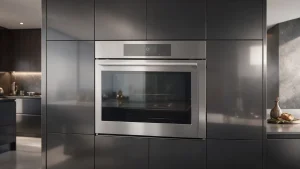
Fisher & Paykel OB24SMPTNB1 Minimal Handleless Self-Cleaning Oven
Handleless 24-inch oven whose door will not release after self-cleaning or whose touchscreen goes blank.
Model-specific diagnosis

Model number
OB24SMPTNB1
About this model
Model overview
The OB24SMPTNB1 is a 24-inch handleless self-cleaning oven from the Minimal line of Fisher & Paykel, with 3 cu ft of capacity and 16 oven functions. The door opens at a button press, so there is no handle to catch on, and a five-inch guided-cooking touchscreen sets each program. Pyrolytic self-cleaning and ActiveVent moisture control handle the cavity and its humidity for homes across San Francisco and the Bay Area. Explain what the oven did before it failed, quote the model number exactly as the label prints it, and copy any touchscreen code.
Specifications
| Dimensions | Width: 23 7/16 inches. |
|---|---|
| Capacity | Total capacity: 3 cu ft. |
| Features | 16 oven functions. Handleless door opens at a button press. ActiveVent moisture control. AeroTech heat circulation. |
| Controls | Five-inch guided cooking touchscreen. |
| Care | Pyrolytic self-cleaning. |
Handleless door and touchscreen on the OB24SMPTNB1
The OB24SMPTNB1 is set apart by its handleless door, which opens at a button press and keeps the front flat and free of hardware. Its 16 functions run from a guided five-inch touchscreen, so the owner follows prompts rather than turning a dial. Day to day, the door release and the screen are the parts the owner touches most, so any sticking door or blank display is worth recording right away.
Lock and sensor checks after a self-clean cycle
A door that will not open after a self-clean cycle usually means the latch stayed engaged while the cavity was still hot, and a technician checks the lock motor and its latch before the door mechanism. Because the door opens at a button press, a door that does not move can also point to the release circuit on the control board. Oven temperature that drifts from the setting traces to the sensor or the board that reads it, while a fan or screen fault points to the fan motor and the display connector. The owner should let the oven cool fully, avoid forcing the door and read the code on the touchscreen before calling. Do not pry the door or the trim away from the oven.
What owners notice
- Door that stays locked after cleaning.
- Oven running off the set heat.
- Display or fan that stops.
- Code showing on the touchscreen.
Booking
Let the oven cool, then tell us the full model number from the label, what it did and the touchscreen code. We test the door lock, the sensor and the display link before quoting. Related page: Fisher & Paykel Oven Repair in San Francisco.
FAQ
Frequently asked questions
Capacity is 3 cu ft, and the case is 23 7/16 inches wide.
It offers 16 oven functions, all selected from the guided touchscreen.
Check the rating label on the frame around the door opening, visible with the door open. Copy every letter and digit, including the ones at the end.
Yes. We book in-home visits for this model in San Francisco and the Bay Area. Add the model number and the symptom to the booking form.
Diagnostics
Error codes for this appliance
Fisher & Paykel Oven A2 Error Code
Fisher & Paykel Oven A3 Error Code
Fisher & Paykel Oven F101 Error Code
Fisher & Paykel Oven F102 / F104 / F194 / F196 Error Code
Fisher & Paykel Oven F103 / F237 / F610 / F613 and Related Codes
Fix it right
Repair service
Book a repair
Tell us what’s wrong — we’ll take it from there
Share a few details and we’ll confirm an appointment. Prefer to talk? Call us and we’ll help right away.
Phone
(415) 941-6957
Hours
Mon–Sat: 8:00 AM – 7:00 PM
Service area
San Francisco Bay Area, California